
01
Live bilingual transcription
Speak Chinese, English, or switch naturally within a sentence and follow readable text as it appears.
HushNote 1.3.1 · Local transcription for iPhone
Recording, mixed Chinese-English live transcription, and speaker processing run on your iPhone by default, with no account required and no default audio upload. Transcript content leaves your device only when you choose cloud summaries or cloud Ask HushNote.
Mixed speech
Chinese, English, and natural switching stay in one live transcription flow.
2–4 people
See live speaker labels, then refine the full timeline after recording.
Smaller install
Large local summary models are downloaded only when you choose one.
On-device transcription
Recording, live transcription, and speaker processing run on device by default, with ASR kept at the highest priority.
No account required
Start recording and organizing your notes without creating an account or uploading a profile.
No default audio upload
Only the transcript content needed for a request is sent when you choose cloud summaries or cloud Ask HushNote.
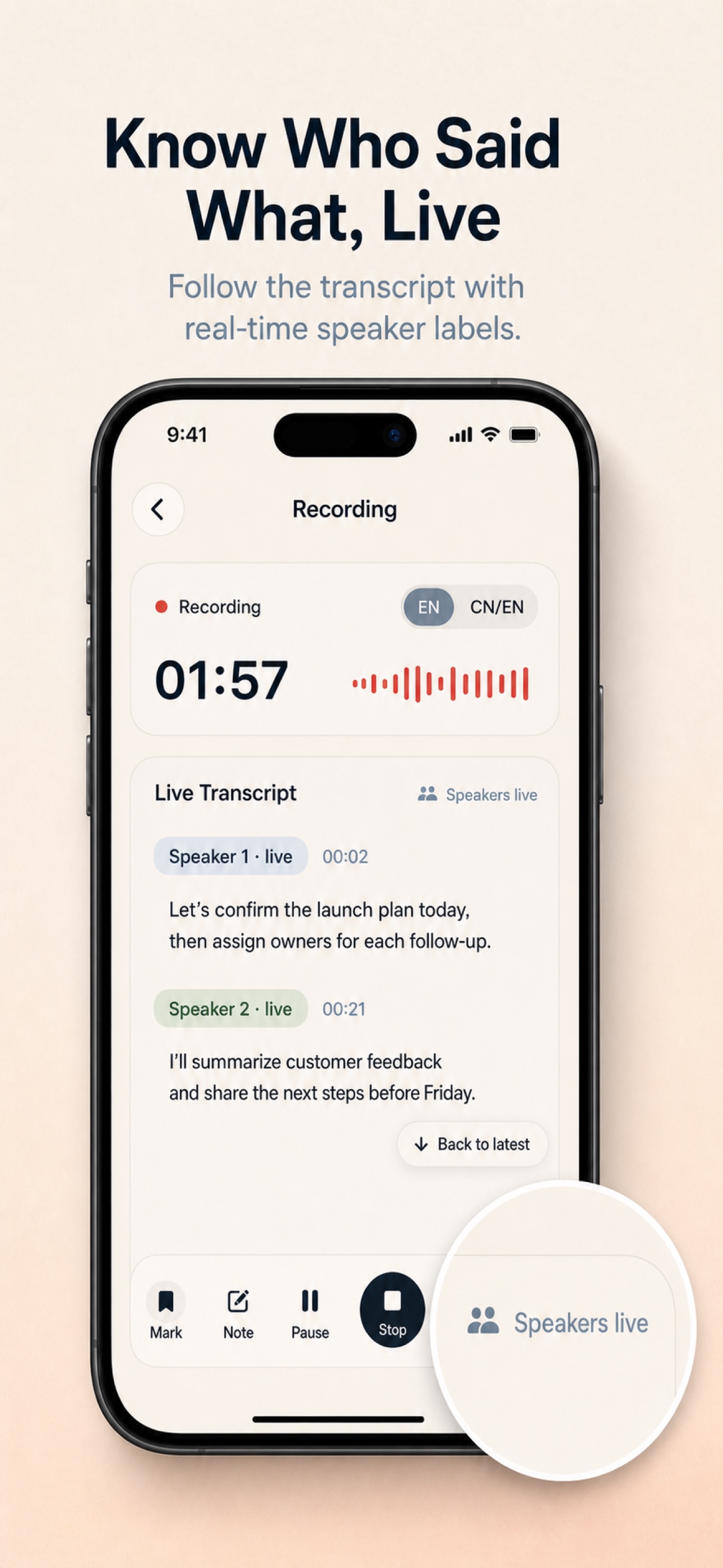
Understand the room while you record
Low-latency transcription keeps you with the conversation, while the complete recording gives refinement models the context they need for a stronger final result.
Speak Chinese, English, or switch naturally within a sentence and follow readable text as it appears.
Designed for 2–4 person meetings and interviews, with each live passage attributed to a speaker.
After recording, HushNote refines transcript segments and the complete speaker timeline without losing the original audio context.
Why a normal recorder is not enough
Many recordings end as long audio files nobody wants to replay. HushNote focuses on the after-work: understanding what happened, what mattered, and what comes next.
Use cases
HushNote is not a generic chat assistant. It is a local-first path from recording or audio import to transcript, summary, and review.
Meeting notes
Follow mixed-language transcripts and speaker labels live, then review refined notes without inviting a meeting bot.
Interview transcription
Turn interviews into readable transcripts, summaries, key moments, and reusable research material.
Local-first voice notes
Capture ideas, classes, calls, and personal recordings with a workflow designed to stay close to the device.
Audio import transcription
Bring existing recordings into the same transcription, summary, and review workflow as live sessions.
Local AI voice notes
On-device transcription and speakers by default, local summary models on demand, and optional cloud features only when configured.
How it works
There is no complicated setup before recording. Start capturing, follow the text and speakers, then let the full audio produce the final reviewable record.
Step 1
Record a meeting, interview, class, or quick thought, or import existing audio from Files and share entry points.
Step 2
Mixed Chinese-English speech becomes readable text, while speaker labels catch up as soon as the model is ready.
Step 3
A stronger model corrects bounded transcript segments, while a full-file pass calibrates speaker attribution. Live labels may change in the final result.
Step 4
When you need to recap, write notes, prepare an interview, or share material, open the session result and export what matters.
New in 1.3.0
This release brings mixed-language live ASR, segment refinement, live speaker labels, and on-demand local summary models into one local-first workflow.
A new bilingual engine produces text as you speak and handles natural language switching in the same session.
After recording, a stronger model rechecks bounded final segments to improve transcript accuracy without shifting their time range.
See speaker labels during 2–4 person recordings, then use the full audio to refine who said what.
Large summary models no longer ship inside the app. Download one when needed, or remove it later to reclaim storage.
Privacy by design
Local recording
Audio stays on your device and is not uploaded to a HushNote server for live transcription.
On-device transcription
Mixed-language ASR and speaker processing run directly on your iPhone by default.
Cloud is your choice
Cloud summaries and cloud Ask HushNote send only the transcript content needed when you explicitly configure and use them.
Free vs Pro
HushNote should be easy to try before it asks you to commit. Use the core flow first, then unlock the full workflow with a one-time purchase.
Try the essential voice note flow.
Unlock the full local-first workflow.
FAQ and support
For support, email works best for private questions. Discord is still available for community feedback.
You can start for free and try the core workflow before unlocking Pro.
No. Pro is currently a one-time purchase.
No. HushNote is built around a single path: record, transcribe, summarize, and review. It is not positioned as a generic AI assistant or a cloud meeting robot.
Yes. Recording, live transcription, speaker processing, and local review run on device by default. Local summary models can also be downloaded when needed, and cloud features are not required.
Not by default. Recording and live transcription happen on your iPhone. Only transcript excerpts needed for a request are sent when you explicitly configure and use cloud summaries or cloud Ask HushNote; that does not upload your audio.
The product is currently designed around meetings, interviews, and general voice notes. The interface prioritizes quick capture and easy review for those scenarios.
Yes. HushNote can export the summary, full transcript, key moments, and original audio once you review the session result.